

Versione italiana disponibile qui → [IT]
Friday, 13 March 2026, a date that might look ordinary. Some cultures consider it unlucky, but for me it has a very specific meaning: I had an idea, and I wanted to make it real.
In fact, the seeds of that idea came from a path that started earlier.
The first seed goes back to 6 May 2025: European Identity Conference in Berlin, second session of the day. Among the top trends expected for 2025 there was the rise of MCP Servers.
I looked at my colleague, and we asked the same question: what on earth is an MCP Server? We need to dig into this!
Months passed and exactly as predicted, MCP Servers started popping up everywhere.
The second seed goes back to 25 February 2026: for a while I had felt the need to write about “legacy stuff”, I spoke with a colleague and finally found the right home for my project. I immediately decided to open this Substack blog and, within a week, I published my first article. It was 1 March 2026.
Being on this platform also gave me the chance to read many interesting posts from other authors. Most of the time these topics are technically far from my day job, yet they resonate deeply with the way I look at things.
But let’s go back to 13 March 2026. I read a post about the evolution of Claude.ai. It talked about how powerful the new models are, and about an experiment in extreme Vibe Coding.
That was the final seed…
The idea started germinating in my head. That evening I began my first conversation with the Claude app. A short back and forth, and suddenly it had a shape:
What if I tried to write an MCP interface for Active Directory?
I slept on it (more or less) and woke up with a fairly clear picture in my mind.
After breakfast I started bombarding the AI with a complete memory dump, and it kept the pace. We reached an initial draft, but the sun was shining and the tall grass was calling. Time to step away.
Cut the grass, reflect, unload, cut again, reflect again, unload again, and so on…
Second round in the afternoon. Another massive dump and the design became crystal clear, so I decided it was time to place a bet:
Can an old sysadmin, with a programming background that stopped at Visual Basic 6, but a solid understanding of systems, build an open source MCP Server project from scratch?
Right then, I spent 20 euros to access Claude Code and the Legacy MCP project was officially born.
Sunday, 15 March 2026, I woke up and dedicated time to my passion for Formula 1, and I was right to do it.
A young Italian talent, just 19 years old, started from pole position, dominated the race and secured his first victory, confirming a bet Mercedes had made on him when he was only 11. His name is Andrea Kimi Antonelli.
I was euphoric and convinced it would be a great day. After lunch I “fired up” the machines and started working, and a couple of hours later I had my first working prototype.
When I realised I could query the data exactly the way I had imagined, my jaw dropped. I was literally staring at the screen thinking: yes, this is a bet worth bringing to the finish line!
This article is not meant to explain a technology. It is meant to tell a journey.
It is the story of what happens when a legacy idea meets new tools, and someone decides to really try, connecting two worlds.
Why it was worth doing
If you have read my previous articles (Chapter 1 and Chapter 2) you already know my point of view. For new readers, here is the short version: despite the push towards the cloud, legacy technologies keep surviving. Over time, however, they are becoming increasingly mysterious, and we need a way to pass that knowledge on.
Every project started by my team begins in the same way: we need to run an assessment and produce a document.
And in most cases, the heart of that assessment is always the same: Active Directory.
For years we relied on trusty PowerShell scripts, more or less standardised, but anchored to one constant: the excellent ADDS_Inventory_V3.ps1 by the legendary Carl Webster.
The problem is that maintaining and evolving those scripts is becoming increasingly expensive, while the outside world is surfing fast on the AI wave.
I did not want to throw that heritage away. I wanted to make it queryable, modular and reusable.
So, I asked myself a simple question: why not try to connect these two worlds?
The turning point was the MCP protocol. It is often described as “the USB port for AI”, an open standard that lets AI systems connect to external modules of any kind.
If you want to dive deeper, here is the official documentation: What is the Model Context Protocol (MCP)?
That is how the idea was born: build an MCP Server acting as a bridge between the Active Directory world and AI systems: Legacy MCP.
In practice, a standard way to query AD using AI tools, shifting the focus from how to do things to what you want to achieve.
As mentioned earlier, during the first two days I had intense sessions with Claude Chat. I defined principles and guidelines that allowed me to see tangible results in less than 48 hours.
One of those principles was a clear boundary between open core and enterprise. Even if it starts with “just” 20 euros, doing things properly takes time, so boundaries are necessary.
The choice was natural and coherent:
if the project takes inspiration from Carl Webster’s work, then the open core must cover everything ADDS_Inventory_V3.ps1 covered for years.
It is a way to give something back to the community, updated to modern technologies.
On top of that, an enterprise layer will be built, requiring different investments and efforts, covering more advanced and sophisticated capabilities.
· open core = inventory and core queries
· enterprise = advanced analysis, reports and integrations
What it can do for you
Legacy MCP was born with a simple goal: make Active Directory queryable, enabling cross correlations across data and shifting the focus towards what I really need to understand.
Depending on the context (offline, local network, internet) the same approach is implemented through different deployment profiles, designed to balance usability and security: A / B core / B enterprise / C.
Across all profiles, the logic stays the same: you bring data into a workspace, then you query. What changes is where servers and data live, and how access is governed.
All operational details are available in the repository, but here we focus on real world use cases.
Three scenarios, three trust levels: file, LAN, internet.
Use case 1 - Remote offline assessment and report
Profile: A (open core)
Scenario: A consultant needs to analyse a remote AD environment. Sometimes they have direct access via VPN or a shared session, in other cases data collection is delegated to the customer.
Approach: Instead of generating a static report, the consultant collects data in a standard way using a PowerShell collector or asks the customer to run it. The output is a JSON file with data and session metadata.
Analysis: On their own PC, the consultant runs Legacy MCP locally, “mounts” the JSON into the workspace, and queries the environment through Claude Desktop.
Result: A structured analysis focused on the areas that matter, and, when needed, a document style output. In this project, a few DOCX reports have already been produced and validated on real environments.
A real example follows. This is the kind of answer Legacy MCP can deliver in seconds to a concrete question about the environment:
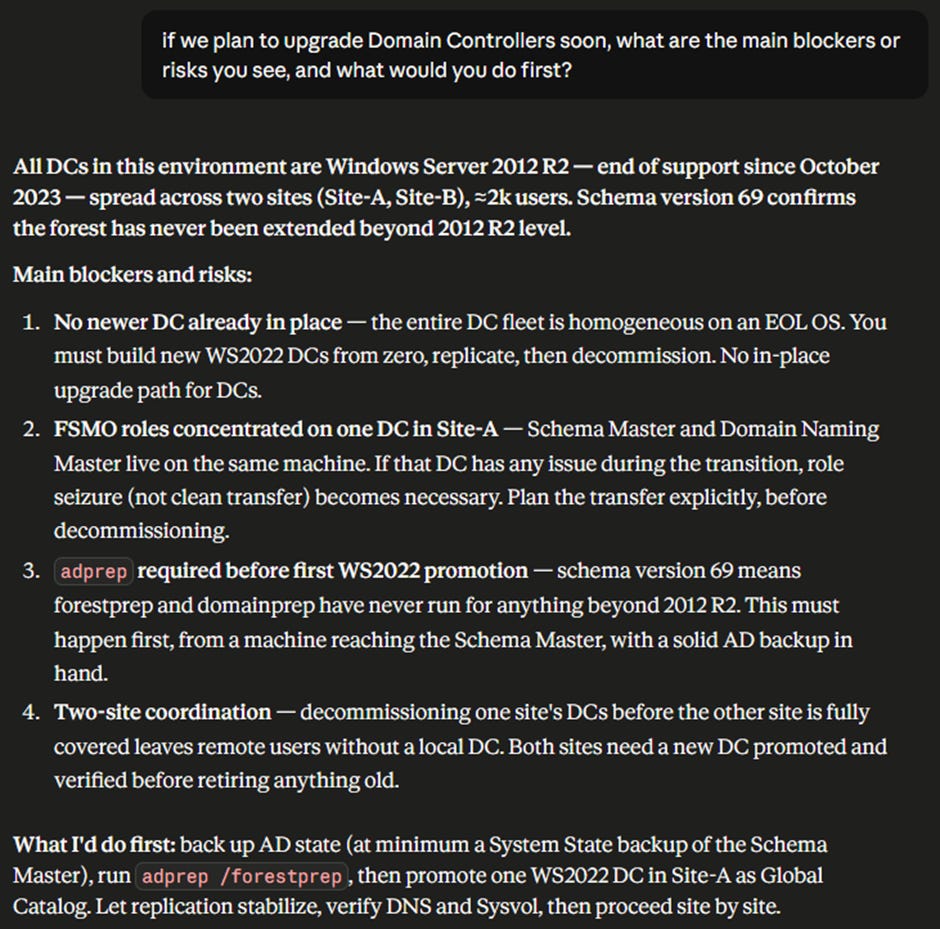
This is the simplest profile: it maximises portability and repeatability and minimises dependence on the customer environment. It also enables cross analysis across related environments.
Use case 2 - Interactive live dialogue and historical comparison with snapshots
Profile: B core or B enterprise (depending on the required security level).
Scenario: IT teams or consultants want to query the environment “live”, with the convenience of a chat driven interaction, without constantly exporting files.
Approach: Legacy MCP runs on the local network on a server inside the Active Directory environment (a member server). Communications are encrypted and the authentication model matches the chosen profile.
Interaction: Clients (Claude Desktop) connect to the MCP server through a bridge module (mcp-remote) on the LAN. In this project, this pattern has been tested end to end on Profile B core with HTTPS and authentication based on protected tokens and keys.
Extra value: When “memory” matters, you create snapshots over time. This lets you mount snapshots and the live view together and ask the simplest and most powerful question: what changed?
Because it operates on live data, Profile B has stricter security requirements (dedicated service account, end to end encryption, governed access). Details are in the repository.
Important note: Legacy MCP exposes read only functions.
Use case 3 - Internet exposed analysis portal
Profile: C (enterprise only)
Scenario: You want to make the assessment scalable and usable as a service: multiple teams, multiple customers, access from anywhere, without requiring live access to the infrastructure.
Approach: Everything stays offline. You upload JSON datasets and manage workspaces via web. Analysis happens through agents that consume MCP over public endpoints.
Security: This profile requires an internet grade protection layer: API gateway (for example APIM) plus WAF. Authentication is delegated to an Identity Provider (typically Entra ID) with MFA, plus RBAC on uploaded data.
Why it makes sense: It is the step that turns a tool into a platform, keeping the same logical model (profiles, workspaces, snapshots/offline), but adding governance and enterprise access.
For now, this is a theoretical use case, but the specifications are already clear. Vibe Coding is great, but there is no way I could have built all of that alone in one month.
Rome wasn’t built in a day
Thinking about Vibe Coding immediately switches me into Legacy Things mode, and in my head, I can hear a well-known song released in 2000: Rome Wasn’t Built in a Day by Morcheeba.
It is the perfect soundtrack for the month-long journey behind this bet.
Everywhere I read articles and proclamations that sound more or less like this:
how I created something from scratch in 35 minutes thanks to AI and Vibe Coding.
From my point of view, that is a half-truth designed to capture attention. Maybe my choice not to use an extreme coding model (Claude Sonnet 4.6) also plays a role, but I want to tell you how I really lived the experience.
First point
It is true that once you provide instructions, a coding engine can produce output in minutes. The real question is this: how much time did I spend thinking, reasoning on my own, and talking with an AI chat before I even reached those instructions?
Using the initial idea as an example, I already told you: two days.
Then it took another 28 days to reach a point where I could say: “ok, we can publish this”.
Of course it depends on “what” you want to build. Effort is proportional to ambition.
Second point
Beyond time, you need a clear direction and a steady hand, otherwise the AI will take you for a walk wherever it wants.
For example, during a long and painful debugging session on live authentication towards Domain Controllers, the AI tried to persuade me to simplify the approach by switching from Kerberos to NTLM.
That is where I stood still and reinforced my security principles, and in the end, we made it work the way I wanted.
In the project memory, I now read: NTLM must never be used. Deprecated. Kerberos only for Live Mode.
Third point
AI does not always find the best solution on its own. Sometimes it loses the key detail.
Another example: while configuring secure client-side access to the MCP server, I struggled with how to handle the API key without exposing it. The solution was to use PowerShell and DPAPI.
Everything looked great until launching PowerShell from Claude Chat crashed with a strange error. After another intense troubleshooting session, the key intuition was mine: run the PowerShell through a simple BAT file, and the problem disappeared immediately.
That session lives in the project memory as “BAT is King”, in perfect Legacy Things style, where an “old” technology fixes an AI problem.
Timeline
Below is a timeline of what I managed to achieve and in what time. Looking at it, I am genuinely impressed, but this is not a 35-minute story:
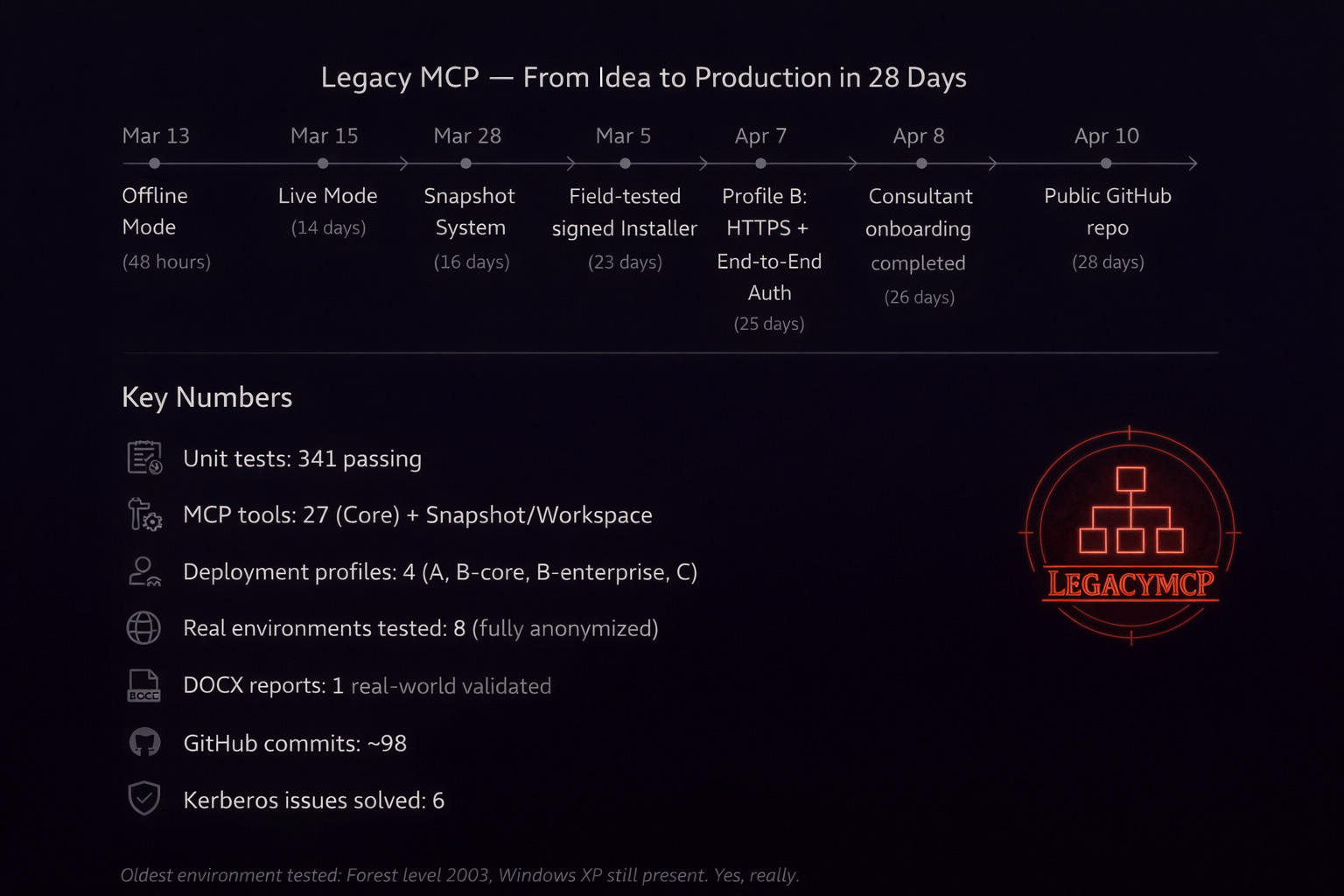
Rome wasn’t built in a day, and neither was this project. AI accelerates everything, but without a guide it would simply crash.
It can help you reach very high peaks, but once you get there, there is one question we must ask: who really climbed the mountain?
Who really climbed the mountain?
When the idea took shape and I decided to dedicate serious time to the project, I felt as if I had a mountain to climb. At first that scared me a bit, but I had nothing to lose, and I knew I could rely on truly cutting-edge AI tools.
I started with a standard baseline on chat-based AI and I knew nothing about AI assisted coding. I was a real “newbie”.
Over time I challenged myself, studied, and understood that to do a good job you need solid soft skills: clear ideas, strong communication skills, tenacity, and a lot of method.
I deliberately chose to write code in a language I do not really know (Python) because what mattered to me was not the code itself, but the result.
After the first few weeks I realised that the main technical limit was the “credit”. Work sessions had to be distributed and optimised across the day and the week. Without careful management, you run “out of fuel” at the worst possible time.
To keep credit consumption low, the key was to reduce context: using the same chat for days saturates the context window and consumes a huge amount of tokens.
Over time I built a structured workflow in three levels that I want to describe.
Tools used: Claude.ai (Pro plan for one month) plus Perplexity.ai, a Pro plan I already had through a yearly promotion.
I then created a project inside Claude and a space inside Perplexity. In both, I attached a status.md file with the overall summary. The same file is also placed in the project root for Claude Code.
For coding, I used VS Code with the Claude Code extension.
Input flow:
1. First draft reasoning on Perplexity using Sonnet 4.6 for consistency with later steps.
2. Perplexity’s instruction draft is then passed to Claude Chat for review and refinement. Claude Chat starts a new session from status.md and generates the instructions for Claude Code.
3. Claude Code executes and produces a summary.
4. Claude Chat reviews the summary and, once the result is stable, closes the session and updates status.md.
5. The updated status.md is then attached everywhere as the new single source of truth.
Output flow:
1. Claude Chat’s summary is passed back to Perplexity as feedback.
2. Testing and debugging sessions start.
3. When variations are needed, the flow goes back into Claude Chat.
How did I get to this method? By reading, experimenting and talking with the AI. It takes self-criticism and lateral thinking, asking yourself from time to time: can I improve something?
But back to the original question: who really climbed the mountain?
My answer is a metaphor: I feel as if I climbed a very high mountain and reached a place I would not have expected, but I had a sophisticated exoskeleton (AI) that massively amplified my capabilities.
An exoskeleton, however, does not go anywhere on its own. The better you become at exploiting its potential, the faster you move.
What I observed and learned
On Monday, 13 April, the repository officially became public. The bet is over, and it is time to take stock.
Did I achieve my goal? Definitely yes!
Could I have done it without AI? Definitely no!
The first key aspect is the collaborative relationship that emerges between you and AI.
There is a continuous process of mutual learning. The more you learn to use the tool in the context of the project, the more it learns to understand you, with one key word in the middle: communication.
AI applied to programming flipped a paradigm: you no longer must learn a language, the tool learns yours.
This shifts the focus from how to get a result to what you really want to get.
For this mechanism to work, the person starting the conversation (you) must be able to do it in the best possible way.
I realised that AI is a powerful amplifier: if your ideas are confused, the result will be extremely confused, if they are precise, the result will be extremely precise.
The second fundamental aspect is domain knowledge: without knowing exactly how things work, you risk drifting away from the goal without noticing, as in the NTLM case mentioned earlier.
This means that with AI you cannot just relax thinking “it will handle everything”. On the contrary, you should focus on learning as much as possible about how things work. This will increase the value of the architect role, which will only become more important.
The third aspect is that AI systems are tools, and like any tool they must be used well.
That is why you need method: try, fail, question yourself and improve. Be careful though, there is no single correct method. Everyone will find what works best for themselves and for their context.
My method worked because it was not written upfront. I built it step by step, constantly asking myself: what can I do better?
I will close with a motto I have carried for 25 years, and today it feels more relevant than ever:
IT systems do not do what you want. They do what you tell them to do.
I hope this story was at least as engaging for you as it was for me to live it. But the journey does not end here. By the time you read this article, the code will already have evolved, and I cannot move forward alone.
Out there, there is a repository waiting to be tested. Put it to the test and tell me how it went.