

Versione italiana disponibile qui → [IT]

Reader’s note: the contrast between the two “memories” described in this chapter is the author’s editorial interpretation, not a statement made by the technical sources cited. The opening scene (Sheffield, James and Franco) is fictional: the characters are not real people. Brexit is used here as an example of a separation process, not as a political comparison. This English version was translated from the original Italian with the assistance of artificial intelligence and subsequently reviewed by the author.
29 March 2017, Sheffield, United Kingdom. Two neighbours say goodbye to each other in the morning as they head off to work.
In the evening James comes home at ease: his day went by in an ordinary, almost dull way. He decides to go to the pub.
Franco comes home uneasy, with little appetite and a lot on his mind. He decides to go to the pub.
The two of them end up facing each other over a pint. Franco has lived and worked in Sheffield for years, but he doesn’t hold a British passport. As of tonight, no one can tell him under what conditions he’ll be allowed to stay.
«Have you heard about today? They sent the letter to Brussels. Article 50.»
«So what?»
«So what am I, now?»
James sets down his glass. He’d like to say something useful, but nothing comes to mind. He has never had to prove to anyone who he is, or how long he’s been there.
That evening marks the start of one of the most striking de-merge processes of recent times. The United Kingdom formally notifies its intention to leave the European Union. The formal exit will come later, on 31 January 2020, followed by a transition period closing on 31 December 2020: just under four years to separate two entities that had been deeply intertwined for decades.
The decision is the easy part. Then an agreement is signed, and from there a complicated process begins. It’s necessary to establish what gets separated, how, and on what timeline, and, among other things, what will happen to the people who have lived and worked inside that system for years but who, once the separation is complete, are no longer meant to be part of it.
Franco is one of them. He’s a citizen of the European Union, and he still doesn’t know whether he’ll be able to carry on with his life in Sheffield or whether he’ll have to move elsewhere.
His identity stays exactly the same; what changes isn’t who he is, but what he’ll be allowed to do within that new perimeter.
In the world of systems, it’s often the opposite: what changes is the account, with its new SID, while the permissions are what we’d like to keep.
In the end, it’s the same old story, and it’s been well known for decades in the corporate world, where IT plays a key role in carrying out the separation of data, technological processes and identities.
Over time, infrastructures have developed features that help support these processes from a technical standpoint. In Active Directory, one of the central tools is the concept of “sIDHistory”, which allows permissions to be carried along even when the account changes.
In May 2017, just a few weeks after that evening, Microsoft released version 1.1.524.0 of Azure AD Connect. It looked like just another update, but the changelog, which today carries the product’s new name, reads:
Microsoft Entra Connect now automatically enables the use of ConsistencyGuid attribute as the Source Anchor attribute for on-premises AD objects. Further, Microsoft Entra Connect populates the ConsistencyGuid attribute with the objectGuid attribute value if it’s empty.
That small word “ConsistencyGuid” would become the key to effectively supporting the new wave of hybrid migrations, where the cloud calls the shots.
Because while the world of on-premises migrations has been thinking in terms of the SID for years, the cloud uses a different approach to identify users, creating no small amount of headaches for IT.
Authorization vs identity: two ways of remembering
Acquisitions, divestitures, mergers, whenever news like this comes in, anyone working in IT already knows what’s about to happen: a migration needs to be organized.
There’s usually quite a lot of work to do; I often compare it to a house move, where you have to catalogue things, throw some of them away, pack everything up, and find the most suitable means of transport to get it to its destination.
Looking at things from a Microsoft perspective, the scope of action was, for decades, the authentication domain (Active Directory), before extending to the cloud with Azure AD (later Entra ID).
And within these perimeters there’s certainly a good deal of data, applications and services to migrate, but there’s only one true backbone to the whole process: identities.
Identities that can represent real people or unattended processes.
Because in the end, what matters most is allowing these identities to do what they used to do, even within the new perimeter.
In practice, you can work in two directions: on authorization, and on identity itself.
The memory of authorization
Authorization, broadly speaking, means “what you’re allowed to do”, whether that’s access to a file, an application, or permission to enter a physical building.
Focusing on the on-premises Active Directory perimeter, it all comes down to the Security Identifier of the user or of the group they belong to, the SID.
The SID was already covered in chapter 2, so we won’t go back over it here.
Every resource an identity needs to access includes those SIDs in its own “Access Control Lists” (ACLs), determining what that identity can do on that resource.
It’s an old mechanism, but a solid one, and it has worked for decades.
The main problem arises when a user or group needs to be “migrated” into a new Active Directory environment: it is effectively re-created, with a new SID.
Clearly, with only the new SID, the user would no longer be recognized by the ACLs that reference the previous one.
To address this problem, Windows 2000 introduced a new multi-valued attribute: sIDHistory.
sIDHistory can hold one or more SIDs coming from previous authentication domains and belonging to the same identity.
For obvious security reasons, it isn’t a field you can freely edit: the intended way to populate sIDHistory is through the DsAddSidHistory call (MS-DRSR), invoked by migration tools, with precise requirements around permissions, auditing and trust.
Once the new account holds the old SID in “memory”, it will be able to access all the previous resources.
Something that isn’t always clear to everyone, though, is that using sIDHistory is a temporary solution: as long as the resources remain in the source domain, this continuity depends on the trust relationship staying available to reach them, for the details, I again refer you to chapter 2.
If the trust is removed, access based on the old SID to those resources is no longer reachable: without that trust relationship, the user can no longer get to the resources left in the source domain, and the “memory” is lost as a result. On resources that have already been migrated, however, it survives even the trust, and that’s exactly why it needs to be cleaned up.
Cleaning it up without interrupting access requires a complementary technique: re-ACLing.
This is a process in which references to the original SID present in the ACLs are replaced or joined by the destination SID.
It’s often a lengthy process, but it’s the only one that allows a migration to be successfully completed, where “successfully” means decommissioning the original authentication perimeter.
And the final cleanup phase shouldn’t be forgotten, removing every reference on identities (sIDHistory) and on resources (ACLs) to the old SIDs.
It looks like the easiest part, but it’s actually the most critical one, the one where you find out whether the earlier work was done well.
Ok, everything holds together when Active Directory is the only thing involved, but what happens if Entra ID enters the equation?
The memory of identity
As mentioned, Entra ID doesn’t use the SID to govern access: it relies on an identifier of its own. To understand what that means in practice, let’s start from a notion that’s well known but fundamental: in the Microsoft cloud, the perimeter is the tenant.
Every object in the tenant, whether a user or a group, has an Object ID that uniquely identifies it: it’s its key. Within that same perimeter live the resources too, mailboxes, SharePoint sites, third-party applications, and access to each of them is governed by pointing, directly or indirectly, to that Object ID.
If we take the case of a tenant-to-tenant migration, standard provisioning tools don’t provide a way to carry an Object ID over into a “history” on the destination tenant: the id doesn’t appear among the fields that can be set through the user-creation APIs. The new object is therefore born with a new ID, and resources and access need to be replicated onto it.
This, then, is a migration with a cut-over: copying the data can be gradual, but the switch happens at one precise moment. From that moment on, the user signs in with the new identity and finds everything they had before. The link to the past only survives inside individual application configurations.
It’s as if our Franco were forced to move to another country: he packs his bags, brings along what he can carry, and starts over in a new house, with new rules and new services. A clean break.
This, however, is only the most linear case. For years now, many environments have been hybrid, and so have migrations, which touch both Active Directory and Entra ID.
What happens when the tenant stays put and only the Active Directory changes?
To understand that, let’s walk back through the mechanism underlying hybridization.
The engine that keeps on-premises identities and cloud identities joined together is typically Entra Connect (formerly Azure AD Connect), through a sync mechanism.
On both sides, every object has an identifier of its own: the SID in Active Directory, the Object ID in Entra. They have different degrees of stability, though. The Object ID stays with the object for its entire life, while the SID changes whenever the object changes domain.
Any sync mechanism needs an “anchor” that relates the two objects to each other, and a value that changes can’t do that job. In the original design of Azure AD Connect, a different Active Directory attribute was chosen: objectGUID.
This is another attribute unique to the AD object, but it’s also present on objects other than users and security groups, for instance, contacts have it too, even though they don’t have a SID.
The objectGUID is taken, converted to base64, and written into a cloud field called “immutableId”.
The fragility of this mechanism shows up precisely when a change happens on the Active Directory side while the tenant stays fixed: the new object will have a new objectGUID, which in turn generates a different immutableId.
If the UPN and mail addresses don’t match, this would cause a new object to be created in the cloud, with the new immutableId and, naturally, a new Object ID, which as a result wouldn’t have access to the same resources. If instead they do match those of the cloud object, which must be unique within the tenant, synchronization would simply fail with an error.
And here we are at the introduction of “mS-DS-ConsistencyGuid”, initially available only for new installations. Support for existing installations would arrive shortly after, with version 1.1.553.0 in June 2017.
Despite what the product changelog says, the attribute’s full name is mS-DS-ConsistencyGuid. It’s a single-value attribute, present since the very first Windows 2000 schema, whose original purpose was “used to check consistency between the directory and another object, database, or application, by comparing GUIDs”.
The insight of 2017 was to use it in a way similar to sIDHistory, to preserve the “memory” of identity. The key difference is that it doesn’t work in “add” mode, but in “replace” mode.
Setting the Azure AD Connect anchor for users to mS-DS-ConsistencyGuid triggers the following:
· At the first useful sync, if it’s empty, the objectGUID value is taken and written into mS-DS-ConsistencyGuid
· Afterwards, the mS-DS-ConsistencyGuid value is taken, converted to base64, and written into the immutableId of the cloud object
· From that point on, the anchor is mS-DS-ConsistencyGuid, and the objectGUID is no longer used for this purpose
By manipulating this attribute, it’s therefore possible to “re-attach” the cloud identity to a migrated Active Directory user, simply by writing the mS-DS-ConsistencyGuid with the source value into the target user before Entra Connect imports it.
The “right” memory
To recap, we’re looking at two memories, which work in different ways.
The first is about authorization. sIDHistory remembers the user’s previous SIDs and allows continuity of access to resources, in a world where users and resources often live in different perimeters. It’s cumulative, but as long as resources stay in the source domain it depends on trusts, and it’s meant to be temporary: once re-ACLing is done, it gets cleaned up.
The second is about identity. mS-DS-ConsistencyGuid doesn’t change, and it remembers who the user is, not what they could do. It acts as an anchor to the corresponding cloud object, and it allows the migrated user to be re-attached to it.
The two memories are used in different historical/technological contexts and solve the migration problem in equally different ways, but the question is: do I have to pick the “right” one, or can I use them together?
Let’s see it in a real-world case.
A real-world case: a business unit divestiture
I’ve never quite understood why, but the whole category of migration projects has always been labeled “Mergers & Acquisitions” (M&A), an acronym that seems to deliberately ignore the seller’s perspective, perhaps so as not to scare off whoever has to deal with it.
A business unit divestiture is one of the most complex situations I’ve ever had to deal with in the M&A category: the kind where you have to make a “cut”, and you never quite know exactly where the perimeter of what stays ends and what must be handed over begins.
Things are further complicated by a widespread mutual distrust between the parties: the two IT teams, the buyer’s and the seller’s, usually don’t want their systems to come into direct contact with each other.
At an operational level, for on-premises this almost always translates into the same choice: in the source customer’s environment, a new “transit” Active Directory environment is created, which will then become the perimeter to be handed over to the acquirer.
At the cloud level, doing the same thing isn’t always straightforward; besides, the only point of contact is the migration tooling, whose scope of action can be precisely restricted.
So, taking a hybrid environment and connecting all the dots into a migration plan, what comes out is a two-phase program:
· Phase 1, migrating the on-premises resources to the transition Active Directory, while keeping the Entra ID tenant fixed
· Phase 2, with the subsequent tenant-to-tenant migration
Today we’re talking about phase 1.
To avoid putting the buyer and the seller in contact with each other, the work in this phase has to be carried out in the source customer’s environment, tightly limiting and controlling every communication with external systems. The target customer’s environment must not be touched.
Leaving aside the creation of the new Active Directory environment and the trust relationship, the first step is replicating the users and groups, with their respective attributes, into the transition directory.
Given the hybrid nature of the scenario, it’s essential to start applying both of the migration techniques described earlier at the same time. On users, both sIDHistory and mS-DS-ConsistencyGuid are replicated, while for groups only sIDHistory is used.
Entra Connect is configured to talk to both directories, but objects in the transition directory are initially excluded, so as not to generate conflicts.
The second step involves preparing the source resources, applying re-ACLing where necessary and digging into application configurations that can’t be handled with SID-based techniques.
Before going further, there’s an important point to consider: in every migration, the main constraint is tied to the UPN suffix used by the users.
The UPN suffix is a forest-level configuration, and it can’t be routed on both sides of a Forest Trust at the same time without causing a “UPN suffix collision”, as we already discussed in Chapter 2.
The transition directory will therefore use a temporary UPN suffix, unless it’s decided to change it outright during the migration.
Let’s go with the first option; at this point we’ll have:
· users in the transition directory with sIDHistory and mS-DS-ConsistencyGuid populated, with a temporary UPN suffix
· groups in the transition directory with sIDHistory
· source resources with permissions in place
· Entra Connect extended to the transition forest
The next step is migrating the workstations, where the first of the two “memories” comes into play, allowing users to keep their access to resources while the workstation migration tools realign the local profiles.
During this transition, access to cloud resources continues to flow through the source account.
For the groups that govern access to cloud resources, there are two possible routes. The first, preferable one, is to create cloud-only groups and replicate the relevant permissions. The second is to sync the groups from the transition directory ahead of time, knowing, however, that memberships will only arrive with the identity cut-over. In both cases, permissions on cloud resources must be replicated.
Once the workstation migration is complete, it’s time to tackle the UPN suffix cut-over phase:
· Entra Connect is paused
· On the source accounts, the UPN suffix is “freed up” by setting a different one
· The suffix is then removed from the source forest and added to the transition one
· The correct UPN suffix is set on the migrated accounts
We’re now ready to see mS-DS-ConsistencyGuid in action.
At this point, in Entra Connect, the source objects are excluded from synchronization and the transition directory objects are included. Re-enabling synchronization, the same source anchor allows them to be matched to the existing cloud objects.
If we’ve done everything right, the “second memory” now takes the stage, re-attaching the corresponding identities from the transition directory to the cloud accounts.
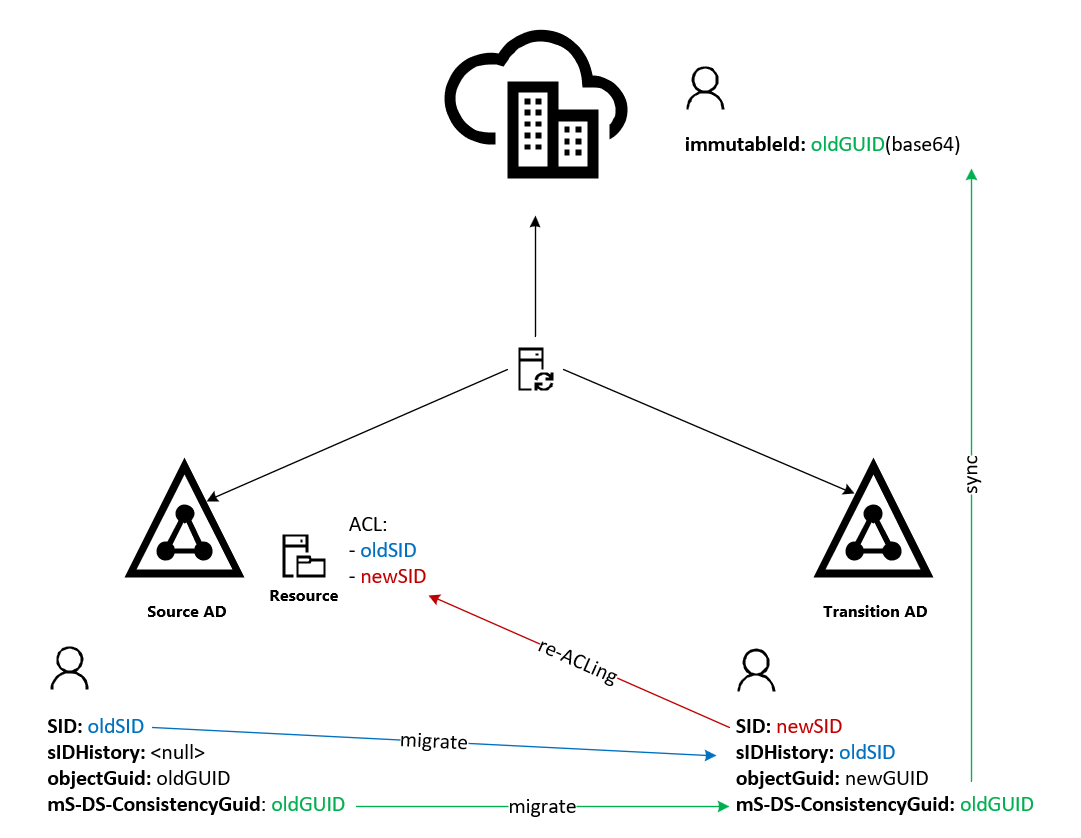
At this point we’ll have:
· Workstations migrated
· Users migrated and re-attached to their cloud identities
· Groups and cloud permissions in place
All that’s left is “just” the resources, which often need to be handled with extra care, as they sometimes hold surprises. What’s more, the scope might only be partial, which can mean migrating only some data, or having to fully reinstall new application farms directly in the new transition perimeter.
Once this part of the “move” is finished too, it’s possible to tackle the final cleanup phase, during which the no-longer-needed SIDs will be removed from sIDHistory and the corresponding ACLs will be cleaned up.
At this point it would be time for phase 2, but that’s out of scope for this article and won’t be covered here.
What the two memories teach us
Taking part in a migration process is almost never a trivial experience; in the end, something always stays etched in the memory of whoever lived through it, whether it’s a technical detail, an organizational struggle, or a brilliant solution.
And as we’ve seen, something always has to pass through the memory of the objects we’re migrating, because years of prior work can’t be erased without consequences. All that’s left to decide is what should be remembered, and how.
Authorization and identity serve different purposes. The first establishes what we’re allowed to do, the second lets systems understand who we are. During a migration we have to make sure both survive the change, but we’ll do it along almost opposite paths.
sIDHistory accumulates access keys. It keeps the old SIDs and carries them along for as long as needed to reach the resources that still recognize them. It’s an effective memory, but one that risks becoming burdensome, and it comes with a built-in expiry date: once re-ACLing is finished, the old perimeter can be decommissioned. It’s time to throw away the old, unused keys.
mS-DS-ConsistencyGuid follows a different logic. It doesn’t accumulate anything; it holds a reference to a single identity and allows it to be recognized even when the account representing it changes. Once it’s used as an anchor to the cloud, that value isn’t something to clean up at the end of the project: it’s what allows the identity to remain the same while the on-premises side is replaced.
Be careful, though: to avoid becoming part of the IT furniture, every memory needs an owner and a stated purpose. Someone has to know why it was created, how long it’s meant to stay, and what event marks its end. Without this accountability, sIDHistory risks turning into a permanent legacy of access that no one dares to remove anymore, while a carelessly managed source anchor can inadvertently break the link to the cloud identity.
But the most important lesson is this: a migration can’t simply be considered successful when the new account logs in for the first time, or when the data turns out to have been copied. It’s successful when the temporary memory has finished doing its job, when the old permissions can be removed without fear, and when the identity keeps being recognized even after its container has changed.
The two memories we’ve looked at work well together precisely for this reason: one lets us get through the transition, the other lets us survive it.