


11 February 1956, CBS Studio 50, New York City. Backstage at Stage Show, the air is charged with the sense of a special occasion. Among the most eagerly awaited guests is a young Elvis Presley.
This is not his first appearance on the show. He has already performed there twice, with great success, but that evening is different: he has been given permission to sing something new.
On the journey from Charlotte to New York, a snowstorm nearly costs him the opportunity, but he still manages to arrive shortly before the broadcast.
A quick stop in the dressing room and then straight onto the stage. The spotlights come on, the cameras turn towards him, and Elvis launches into Blue Suede Shoes, the song Carl Perkins had written the year before, and turns it into a worldwide phenomenon.
Those blue shoes quickly become a cultural phenomenon, the object of desire for an entire generation, filling shop windows, wardrobes and the collective imagination.
But, like every fashion, they too eventually fade. They remain beautiful objects, perhaps still perfectly usable, but forgotten in a corner because the world around them has started longing for something else.
Turning our attention to the IT world, 1956 is also the year of the Dartmouth conference, organised by John McCarthy, which established Artificial Intelligence as a field of research.
That same year, IBM introduced the RAMAC 305, the first commercial computer equipped with a random-access disk drive: the IBM 350, the ancestor of modern hard disks.
From that point on, IT professionals quickly learned to preserve everything: data, configurations, accounts, keys, settings created to solve a specific problem and then left in place because, after all, they continued to work.
And just like fashions that are eventually forgotten, the cycle has shortened in IT as well. Today, ten years can be enough for a cloud feature to become legacy.
And this is where the story of AZUREADSSOACC$ begins, the account forgotten in so many Active Directory environments.
Seamless Single Sign-On: The New Thing in 2016
To understand why that account ends up there, forgotten in a corner of the domain, we need to go back to the moment when the idea behind it was born.
It is 2016, and Office 365 is gathering pace. More and more organisations are beginning to move email, collaboration and application services beyond the traditional perimeter, but most identities, services and especially workstations remain firmly rooted in Active Directory. The cloud is growing quickly; identity remains hybrid.
In that context, user experience becomes a central concern. The organisation is starting to move users to Office 365, but it does not want every access through a browser, Outlook or a cloud service to trigger yet another credential prompt. The user has already switched on the PC, entered their credentials and authenticated to the domain. Asking them to do it again feels absurd in a world where SSO has already been the norm for years.
The most complete answer to the problem does exist, however, and at that time it is called Active Directory Federation Services. ADFS makes it possible to retain control of authentication on premises while speaking the cloud’s language natively. It works, it is mature, it is powerful. But it is not lightweight.
Deploying ADFS requires infrastructure, servers, load balancing, certificates, secure publishing to the Internet, monitoring, patching, expiry management and specialist expertise. It is not simply another option to enable. It is a piece of architecture that must be designed, protected and maintained.
If ADFS is not governed properly, the classic problem is the certificate expiring while the IT team is on holiday, bringing everything to a sudden halt.
It is precisely in this context that Microsoft starts looking for a simpler way out. The goal is not to maintain a complete federation farm, but merely to spare users an explicit credential prompt when they are on a corporate PC and inside the corporate network. The question therefore becomes: can the same result be achieved with something much smaller?
This is how Seamless Single Sign-On is born, a feature designed to complement cloud authentication scenarios based on Password Hash Synchronisation or Pass-through Authentication. It does not replace those methods; it sits on top of them. Its purpose is very specific: to remove the authentication prompt when the right conditions are met.
With Password Hash Synchronisation, authentication is handled in the cloud using information derived from password hashes synchronised from Active Directory. With Pass-through Authentication, validation instead passes through on-premises agents that query the domain. Different paths, the same outcome as far as the user is concerned: sooner or later, an explicit credential prompt appears.
Seamless SSO tries to make that step invisible. It does not change the primary authentication method, it does not turn PHS or PTA into ADFS, and above all it does not invent a new protocol. Instead, it uses something that has already existed in all these environments for years: the user’s Kerberos session on a domain-joined device.
And this is where the 2016 context becomes essential to understanding those architectural choices.
Enterprise environments are still full of Windows 7, Internet Explorer, traditional Active Directory domains, Group Policy, perimeter-based corporate networks and workstations that spend almost all their time inside the office. The idea of a corporate PC, connected to the LAN and already authenticated to the domain, is still the de facto standard for user experience.
From an operational perspective, the major advantage is this: no additional on-premises servers are required, there is no longer any need for an ADFS farm, and nothing new has to be published to the Internet. The feature is enabled from Microsoft Azure AD Connect (Entra will come later...) and the system creates a special computer account in Active Directory called AZUREADSSOACC$.
Is that all? Of course not.
That account sets the entire mechanism in motion, becoming the point of contact between two worlds. But let us look at what is happening under the bonnet.
Since modern cloud protocols cannot simply be brought into Active Directory, the opposite approach is needed, and at the heart of it lies an old acquaintance of ours: the Kerberos protocol.
The SPNs required for the sign-in process against Microsoft Entra ID endpoints are registered for AZUREADSSOACC$, and the account’s Kerberos key is securely shared with the cloud. From that moment on, Entra ID can understand and validate a Kerberos ticket issued by the on-premises Active Directory for that specific service.
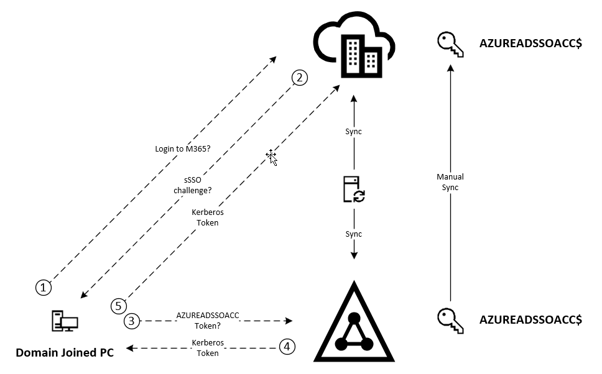
In simplified terms, the flow works like this:
· the user signs in to a domain-joined PC and receives the usual Kerberos tickets.
· when the user opens a compatible Microsoft 365 service, the browser attempts to reach the authentication endpoint dedicated to Seamless SSO.
· if that endpoint is treated as part of the local intranet zone, with Windows Integrated Authentication enabled, and the device can communicate with a Domain Controller, the browser obtains a Kerberos service ticket for the service represented by AZUREADSSOACC$ and presents it to Microsoft Entra ID.
At that point, the cloud uses the shared key to decrypt the ticket, matches the identity it receives to the synchronised user and completes sign-in without asking for the password again.
For the user, it is all simple and transparent. For the administrator, it is little more than a configuration setting. For Active Directory, however, it is simply Kerberos carrying on with its job.
The Forgotten Shoe in the IT Closet
The IT world has always been permeated by the philosophy of “if it works, do not touch it”, according to which questioning any process that is running silently and without complaint is a mortal sin.
Seamless SSO embodied that philosophy perfectly.
It was a perfect solution for the context in which it had been designed: Active Directory, Kerberos, domain-joined PCs and a corporate network regarded as the natural centre of the user experience.
The problem is that that world is no longer the same.
Over the years, the centre of gravity of identity has shifted towards a different model, one in which systems began speaking directly to the cloud and a new generation of browsers took hold, eventually making modern authentication the new standard.
This evolution was supported by the consolidation of protocols such as OAuth 2.0 and OpenID Connect, alongside a gradual shift of applications and controls towards the cloud.
In the Azure AD world, which would later become Entra ID, two elements radically changed the landscape: Conditional Access for governing and securing access, and Windows Hello for Business for the user experience.
Not all of this arrived everywhere at the same time, and not every environment moved at the same pace. One thing, however, is clear: the convenience that seemed perfectly aligned with the way organisations worked in 2016 has now lost its usefulness in many contexts.
Yet it remains a constant presence, something we saw clearly during recent efforts to remediate the use of RC4 in Kerberos: every report we produced invariably contained a reference to AZUREADSSOACC$.
Seamless SSO was slowly forgotten like an old “blue suede shoe” in the IT closet. But its presence means something radically different today.
In environments now dominated by Windows 11, with the occasional Windows 10 device still present, the integrated sign-in experience is increasingly tied to Hybrid Join or Entra Join configurations, drastically reducing the scenarios in which Seamless SSO still provides genuine value.
The feature has nevertheless left us with two uncomfortable Kerberos legacies: RC4 encryption and key management.
The first legacy concerns the way the account is created. Historically, AZUREADSSOACC$ is created with RC4 enabled, making it a special case compared with the usual reading of environments described in Chapter 4. We are not dealing with an ordinary account that simply needs remediation. We are dealing with a feature that was born this way, with a compatibility choice embedded in its original design.
The second legacy is even more subtle, because it is not merely about a technical configuration, but about how that configuration should be governed over time.
Microsoft recommends rotating the Kerberos key of AZUREADSSOACC$ at least once every 30 days. On paper, this is a sensible recommendation: that key is the secret that allows Microsoft Entra ID to validate Kerberos tickets issued by the on-premises Active Directory for Seamless SSO. Preventing compromise requires a controlled lifecycle.
The problem is that the operating model has always carried a contradiction: rotation is recommended, but it has never become an automatic feature of the product.
Rotating the key requires a PowerShell procedure to be run on the Entra Connect server, authenticating to the cloud with a highly privileged administrative role and to Active Directory with sufficient rights to modify the computer account.
In plain terms, we are talking about an interactive command that must be run with elevated privileges in the cloud and an active on-premises connection.
Initially, administrators could refine the script and turn it into a scheduled task. Over time, however, truly automating an operation that requires privileged credentials in two different worlds has become almost a paradox.
On one side, Entra ID increasingly requires MFA, Conditional Access and strict controls over privileged roles; on the other, the scheduled task simply wants to start at three in the morning and do its job without anyone having to intervene.
This is where the 30-day recommendation meets reality, with the practical result that it is all too often ignored.
And so the account remains there, with a Kerberos key that should rotate every month in theory but, in practice, has not changed for years in far too many environments.
The result is that, in every environment where Seamless SSO is still enabled, a potential attacker already knows which account to look for. And far too often they find a Kerberos key that has remained unchanged for years, tied to a cryptographic configuration originally built around RC4.
An invitation far too tempting to ignore.
This is how an extremely useful feature quietly turned into an attack surface. If that key were compromised, the problem would not remain confined to the on-premises perimeter; it could open the door to a silver ticket attack: a Kerberos ticket carefully forged to present itself to the service as legitimate, allowing an attacker to impersonate users when authenticating to Microsoft Entra ID through Seamless SSO.
AZUREADSSOACC$ should therefore not be treated as just another object, but as a critical asset. It is an object that must be assessed carefully within the organisation’s Tier Model, because its compromise can have consequences far broader than its harmless appearance would suggest.
And this brings us to the point: Seamless SSO did not become a problem because it was wrong. In 2016, it was a pragmatic answer to a genuine need, just like so many of the technologies we have covered in this series. The problem begins when the answer remains in place after the question has changed.
A feature created to simplify access in a world of domain-joined PCs, corporate networks and browsers that needed to be tamed now risks remaining enabled in environments that no longer truly need it. Not because anyone consciously chose to leave it there, but because no one remembered to remove it from a world to which it no longer belongs.
The right question is therefore not “how do I manage it?”, but “do I still need it?”.
What the Forgotten Shoe Taught Us
The first lesson this forgotten shoe leaves us is that, in IT systems, adding a feature is almost always easier than removing it. Seamless SSO began as a simple option within Azure AD Connect: a few steps, no new infrastructure and a benefit that quickly became visible to users. At the time, no one had any reason to wonder how it would eventually leave the stage.
Unfortunately, this is a recurring asymmetry in enterprise architectures: the arrival of a new commodity comes with a project, a clear need and people who understand why it exists. Its departure, on the other hand, comes years later, when the context has changed, the people are no longer the same and that feature has by then become part of the background noise.
The second lesson is that every convenience introduced into an architecture also creates an operational debt. In the case of Seamless SSO, that debt took the form of a critical account, a Kerberos key that must be rotated, a cryptographic configuration that must be maintained and a dependency between Active Directory and Entra ID. The benefit arrived immediately; the bill came much later, often to people other than those who had made the original decision.
There is an even more interesting paradox: the evolution of security has not merely made Seamless SSO less necessary; it has also made it harder to govern according to the original recommendations. MFA, Conditional Access and the protection of privileged roles are essential advances, but they do not sit comfortably with a scheduled task that is expected to use elevated privileges silently in both the cloud and the domain. The new security model therefore ends up being incompatible with the old commodity’s maintenance approach, too often leaving it in a state that increases the attack surface.
The third lesson concerns the criteria we use to decide what may remain within an architecture. A feature should not stay there merely because no one has yet found a reason to turn it off. It should remain because someone has verified that there is still a valid reason to keep it enabled, that the benefit is real and that the cost of governing it is proportionate.
If Seamless SSO is still genuinely needed, then it must be governed as the critical asset it is: documented, monitored, protected and maintained. If, instead, the remaining benefit has become marginal while cost and risk continue to grow, removing it does not mean discarding the past for the sake of change. It means carrying out architectural maintenance.
Perhaps this is the real lesson of the shoe we found forgotten in IT closets: not everything we have preserved necessarily deserves to be restored. Some things have simply completed the task for which we chose them, and continuing to polish them will not make them necessary again. Sometimes the most responsible choice is to open the closet, recognise what is no longer needed and make room.