

Versione italiana disponibile qui → [IT]

Summer 1998, my first real job: I find myself handling hundreds of Motorola 8700s, the flip phone everybody wanted. Before long, I manage to connect the systems into a Windows NT domain, transforming the operators’ disconnected way of working into something modern.
Outside that room, the world was living through an intense summer.
In Italian cinemas, The Truman Show was all anyone talked about: a man living a perfect life, unaware that every detail around him had been carefully constructed. A reality flawless in form, false in substance. In the 1998 World Cup in France, another small mystery was unfolding: people said the group-stage draw, presided over by Platini, was not as random as it looked. The official sheet was crystal clear, the numbers were there for everyone to see, and yet the outcome seemed written before it had even begun. Something did not add up, and the admission would only come 20 years later. And while kids were spending hours playing FIFA Road to World Cup 98 with Song 2 by Blur in their ears, on the other side of the Atlantic Bill Clinton, in January, looked straight into the camera and told the whole world that he had not had any relationship with Monica Lewinsky. He would be contradicted on August 17.
Three different stories, one common thread: a trustworthy source returning an answer that does not match reality.
In those same days, in a Microsoft datacenter, Windows NT 4.0 Terminal Server Edition, codenamed Hydra, was quietly released. With it, what everyone would later call Terminal Services was born, and what the world now knows as RDP.
Almost twenty seven years later, on a system protected by one of the most advanced security platforms in the world, a user tries to open an RDP session and is met with an unmistakable message: “A user account restriction is preventing you from logging on.”
The Domain Controller has spoken, the IP is the right one, the source is trustworthy.
And yet here too, something did not add up.
The scenario
Unlike the previous chapters, in this article we will not be talking about the technology itself, the RDP protocol is only the trigger for a more tangled situation, which is why we will instead dig into the specific scenario, one that turned out to be very interesting.
Let us begin by describing the context which, at first glance, has no connection with cloud technologies and appears to be very common, almost ordinary.
It is one of those environments that anyone working with Active Directory encounters often, especially in the enterprise world:
An Italian branch of a multinational company, with a strong on premises focus, and an Active Directory infrastructure layered over time. The guidelines come from HQ.
A child domain, inherited from a reorganization that took place years earlier, and a handful of Domain Controllers distributed across multiple sites: some physically on premises, others hosted on cloud infrastructure, integrated into the design as a simple extension of the corporate perimeter.
Nothing unusual. Nothing that, on paper, would suggest imminent problems.
It almost sounds like the opening of Falling Down, but that is another film entirely…
For years, the daily operational work on the XYZ application had been carried out using a shared generic administrative account: XYZ-admin.
A choice that today would make anyone who talks about Identity governance or Zero Trust wince, but which had always done its job over time and, by the logic of “if it works, do not touch it”, remained there as a legacy inheritance.
RDP access, maintenance activities, urgent interventions: everything had gone through that account for years, without issues.
Until one day, it stops working.
Not gradually. Not “sometimes yes, sometimes no”. Suddenly, access is gone.
Every RDP logon attempt with that account returns the same result:
“A user account restriction is preventing you from logging on.”
No apparent change, no declared modification, no alert explaining what is happening.
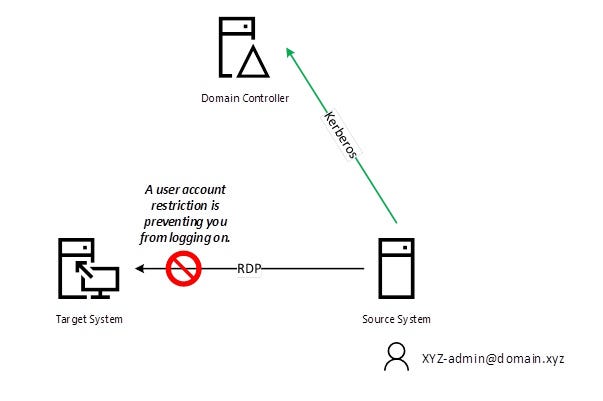
The issue escalates to the customer’s IT staff, who begin an initial round of troubleshooting. The first instinct is the most natural one: try a different Domain Controller.
Force authentication toward different DCs, perhaps in different sites, to rule out a localized problem.
But the result does not change, same answer, same error.
Meanwhile, a timing coincidence emerges that is hard to ignore: in the previous days a patching cycle had been carried out on the Domain Controllers.
The lead seems promising.
The customer checks the installed updates, looks for articles on the internet, compares versions, and starts to suspect widespread bugs by digging through IT forums.
It is a logical and reassuring explanation: something changed, therefore something “broke”.
The problem is that, even after digging, nothing emerges:
· The patches on the DCs are aligned
· No other users are complaining about access failures
· There are no obvious errors in the logs that would justify such selective behaviour
At this point the customer’s ideas begin to run out.
The most obvious hypotheses have been explored, the standard checks completed, and no quick solutions have emerged.
Only then does the customer decide to open a ticket with our support team.
And that is exactly where the situation becomes interesting.
The analysis
The issue is then assigned to one of the consultants on my team, who starts digging deeper. The first thing he does is retrace the path already taken by the customer, following the old logic that “trust is good, not trusting is better”. Nothing new.
He then turns to a detailed analysis of the error message: “A user account restriction is preventing you from logging on.”
These “user account restrictions” are settings that come from far away, from the days of Windows NT 4. The ones that usually have a direct effect on RDP sessions are Logon Time Restriction and Workstation Restriction.
The user is checked, but there is no trace of those settings, everything seems in order, and the same goes for the GPOs applied to it.
The events on the Target System are then checked, but again, nothing.
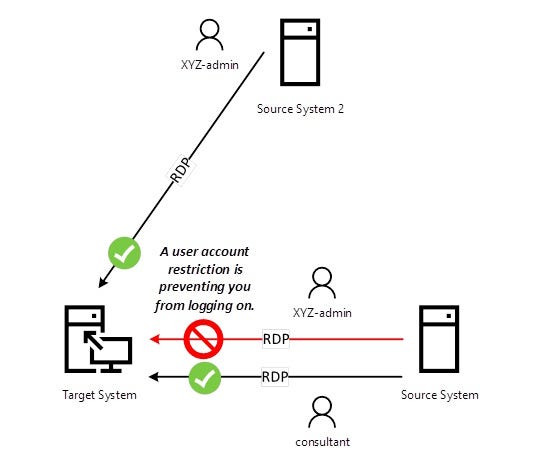
The perspective then shifts to empirical testing with other accounts, revealing some curious behaviour:
· Trying to log on through RDP to the same server with the consultant’s user account, access succeeds
· Trying to create a new user and log on through RDP with it results in the same error
· Trying to use a different Source System and the user XYZ-admin, access succeeds
So, it is not just a user issue, but a combination of: user + Source System + Target System.
In this case as well, the matter ends up on my desk for an opinion. We begin to dig deeper, starting from what I consider the tablets of the law of troubleshooting:
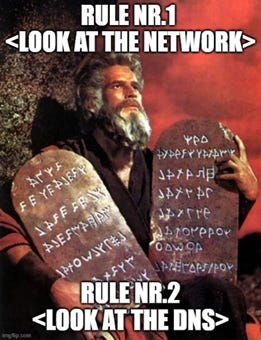
A network trace is then taken on the Source System, and interesting things start to emerge:
· The RDP session never gets to talk to the Target System, the block happens earlier
· A correlation with the error message is found:
o The Source System starts an RDP session toward the Target System
o The Source System then talks to a Domain Controller, asking for authorization for RDP access for user XYZ-admin@domain.xyz toward the Target System
o At that point the Domain Controller responds with a Kerberos error: KDC_ERR_POLICY
· When the connection comes from Source System 2, there is no trace of the Kerberos error
· When the connection comes from the Source System, but using the consultant’s user account, no Kerberos error is returned
Attention then shifts to what is happening on the specific Domain Controller, by analyzing its logs in detail. And here something incomprehensible happens: an event is recorded that matches precisely, by date, time and scope, the one seen in the network trace, except that it has a positive outcome: it is a legitimate authorization to access!
So, the Domain Controller is convinced it returned an OK, while the Source System receives a KO in response. Who or what in the middle is lying???
The analysis continues and, with more network traces, other curious things come to light:
· All the successful calls from Source System 2 always request authorization from one specific Domain Controller.
· All the failing calls from the Source System never request authorization from the Domain Controller that Source System 2 talks to, in fact they contact random Domain Controllers around the world.
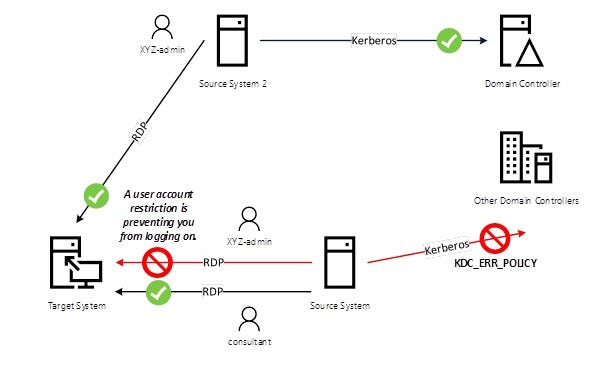
We have therefore identified the error sequence, but the cause is still not clear. If anything, the evidence only makes things more confusing.
With the conviction that “there is something in the middle”, supported by the lack of dialogue with the only “good” Domain Controller, the investigation turns back to the network, and this time a ticket is opened with HQ network support.
There is still, however, the question of why the consultant’s account works normally.
A few days go by, and an interesting message arrives from HQ: I fixed the account, try again now.
Wait… what do you mean by “I fixed the account”, what is the explanation behind all this?
In any case, a new test is run and, wonder of wonders, everything works!
Further clarification is then requested, after all this effort we need to understand.
The answer is disarming: it is CrowdStrike’s fault, which had marked the user as “non-human”.
So, we were right, there really was something in the middle. Only no one had visibility into what it was.
But let us go in order and reconstruct what happened, because this is one of those interesting situations where chaos and misunderstandings rule the scene:
· CrowdStrike has a module called “Identity Protection”
· HQ deployed the CrowdStrike agent on the Domain Controllers, all except the one that Source System 2 was talking to
· CrowdStrike ran a scan and identified XYZ-admin as a Non-Human Identity
· The agent on the Domain Controllers took control of the Kerberos responses, modifying them on the fly according to its own parameters
· The Domain Controllers were therefore convinced they had answered OK, but the agent converted that into KO
· To make matters worse, there really was a network problem: the Source System had its path blocked toward the “good” Domain Controller, obtaining a regular KO for the RDP sessions of XYZ-admin
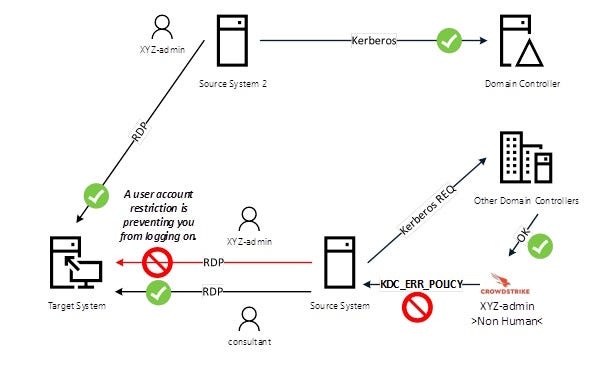
The thing that struck me most about this strange case is this: we are facing a modern cloud technology, CrowdStrike, governing legacy technologies without taking their real effects into account, generating strange behavior and misleading errors.
The concept of Non-Human Identity also enters the equation, something with deep roots in legacy environments, yet one that has become extremely current under the pressure of AI systems.
And for the record, the poor Domain Controller was not to blame: it really was trying to tell the truth…
Lessons learned
The first lesson this case leaves us is only simple in appearance: even the most authoritative sources can tell a distorted truth. And behind it there is not always a bug or a bad configuration, but often the fact that the context in which they operate has changed, while they continue to do their job with implacable consistency.
The poor Domain Controller was not broken or “a liar”.
It was doing its job, answering with confidence.
And yet the answer that arrived was not the useful one. It was formally correct, substantially wrong.
The second lesson concerns the way we interpret errors.
Misleading messages, logs without errors, inconsistent behaviour across identical systems: modern troubleshooting sometimes offers no direct clues. Legacy mechanisms become intertwined with ever more sophisticated layers of protection, “governed from above”, creating scenarios where every piece of the chain seems to be working… but the result still does not add up.
Finally, reconnecting with chapter 2, there is a larger lesson: trust in the system is often taken for granted.
We trust the Domain Controller, DNS, the network, the agents, the cloud protection layers. But every element introduces its own model of truth, built within its own perimeter. When those models are not aligned or do not talk to one another coherently, what we receive is not an explicit error, but a “correct” answer that no longer represents reality.
And this applies not only to human accounts.
More and more often, in modern infrastructures, the truly critical identities are not those of people, but those of processes, services, connectors and scheduled jobs. Non-Human Identities operate under the surface, often with privileges that remain invisible, and they make decisions on their own. It would be naive to think they cannot run into the same paradoxes or create new ones.
What Are Non-human Identities? | Microsoft Security
For now, the lesson remains clear:
in complex systems, truth does not disappear cleanly. It hides in silence, until someone decides to look in the right place.
This chapter is for Denys, who found the truth in the right place. I hope that even now he is in the right place.